
No promises: live systems, one by one.
Foreword
Before downloading the game, take a few minutes to read this page carefully: it explains how ImperiaWorld really works, system by system.
ImperiaWorld is not a server thrown together in a weekend: every system below was written — and often rewritten from scratch — for people who play for months, not for one evening.
The client is translated into nine languages, runs on our own sources, and everything you read here is already live in game: this is not a list of promises.
Important information
Everything you need to get started: where to download the game and where to find us. Discord is the official channel — announcements, events, support and reports all go through it.
Follow us on social media too, so you never miss an announcement.
The basics
The questions everyone asks, answered plainly.
What kind of server is this?
An Italian server with its own sources and a dedicated client, translated into nine languages.
What is the level cap?
The cap is level 165.
How many kingdoms are there?
Three. You choose at character creation; it decides your starting city, allies and enemies.
Do I have to pay to be competitive?
No: the premium shop sells costumes, comfort and time-savers — not items that make you stronger. Strength is built in game, like everyone else.
Does my shop keep selling when I log out?
Yes. The offline shop stays open with the client closed, and you collect the earnings when you return.
Are dungeons instanced?
Yes: every party enters its own copy of the map — no queues, no boss stealing.
Can I play in English?
Yes: interface, items and quests are fully translated.
Where do I ask for help?
On the official Discord: that's where staff and community answer.
Language support
Interface, items, descriptions and every quest in nine languages. Pick your language at startup — no separate client needed.
 Italiano
 English
 Deutsch
 Español
 Polski
 Português
 Română
 Türkçe
 العربية
 Magyar
 Français
 Ελληνικά
Maps and territories
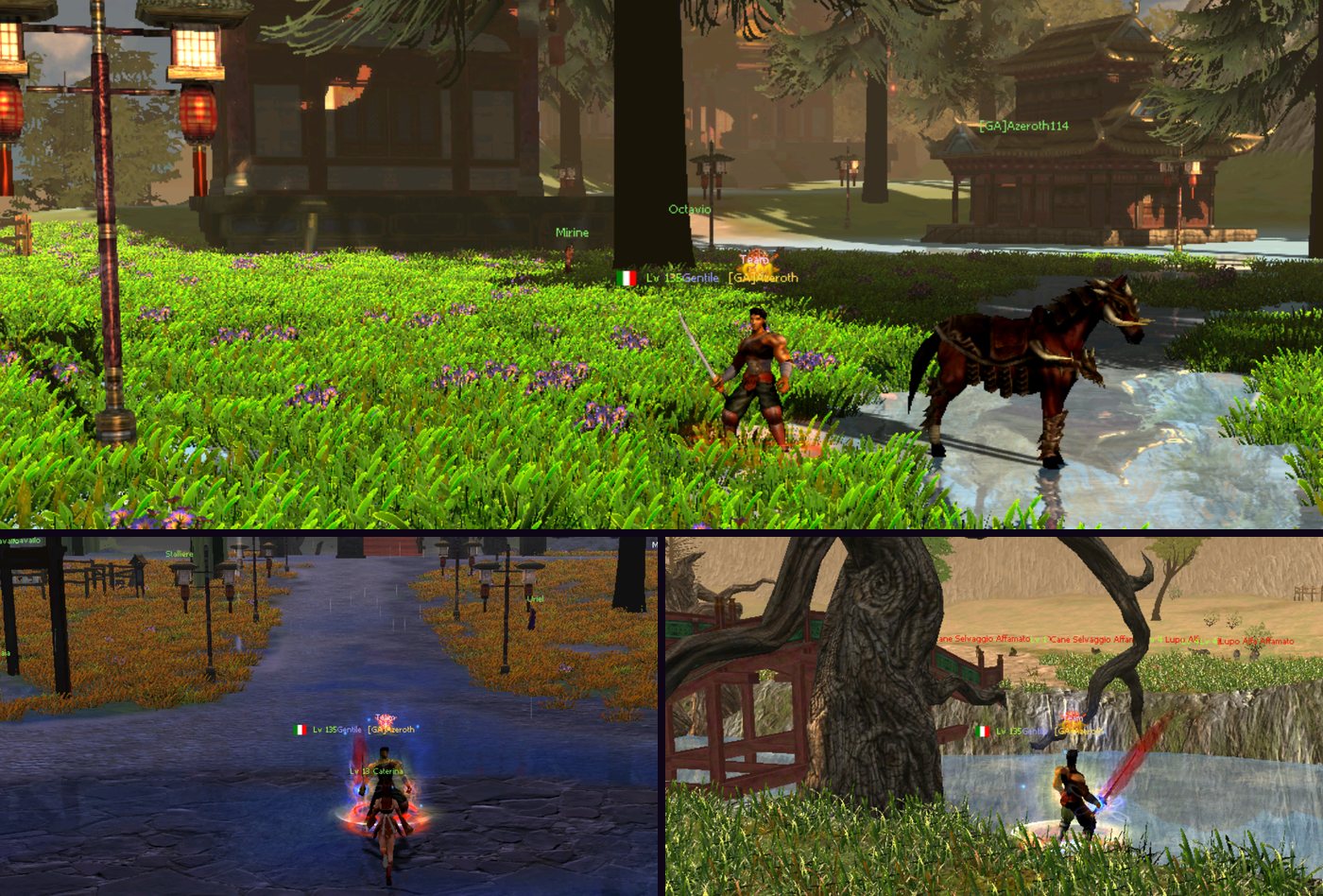
The world stretches from the lands of the three kingdoms to the neutral war zones, through hunting grounds made for every level range.
Every region has its own monsters, bosses and quests: there is no single map where you do everything. The zones follow your progress up to level 165.
Getting started
Pick the kingdom and class you prefer: the starting zone walks you through a quest chain that teaches combat, progression and economy one step at a time.
You don't start empty-handed: every new character receives the full set of their class, all +9, a mount already at level 21, the first skills unlocked and the kit below.
More equipment packages arrive at level 30, 35, 70 and 90: your progress never stalls because of a missing piece.
Starting equipment
 Horse
Horse
 Sigillo di Ellie
 Fire Phoenix Seal
 Teleportation Ring
 Cloak of Courage
 shman
shman
 Lollipops of strength
 Elixir of the Sun (S)
 Elixir of the Moon (S)
 Green Elixir
 x200
Strengthen Object
x200
Strengthen Object
 x10000
Enchant item
x10000
Enchant item
NPCs and shops
City NPCs sell everything you need along the way: weapons, armour, potions, stones, bait, dungeon keys.
On the official page you can open every counter and see what it sells: the list comes from the server database, so it always matches the game.





General store
 x50
Consecrated papyrus
Eliminates the risk of destroying an object if the update fails. The cost of this is that the quality is reduced by 1 point.
x50
Consecrated papyrus
Eliminates the risk of destroying an object if the update fails. The cost of this is that the quality is reduced by 1 point.
 Papyrus Stone Spirit.
The scroll allows you to extract the Spirit Stone from a weapon or armor. Leaves a mark of extraction.
Papyrus Stone Spirit.
The scroll allows you to extract the Spirit Stone from a weapon or armor. Leaves a mark of extraction.
 Fruit of Life
Increases ranking points by 2000.
Fruit of Life
Increases ranking points by 2000.
 Mysterious Chest
This chest contains 45 blocks of 2000 item enchantments.
Mysterious Chest
This chest contains 45 blocks of 2000 item enchantments.
 Biologist package
This pack contains all biologist items up to level 105. Ogre's Tooth (x10) ~ Book of Curse (x15) ~ Demon's Memory (x15) ~ Ice Ball (x20) ~ Zelkova Branch (x25) ~ Panel Tugyi (x30) ~ Red Ghost Tree Branch (x40) ~ Leader's Notes (x50) ~ Gem of Envy (x10) ~ Gem of Wisdom (x20).
Biologist package
This pack contains all biologist items up to level 105. Ogre's Tooth (x10) ~ Book of Curse (x15) ~ Demon's Memory (x15) ~ Ice Ball (x20) ~ Zelkova Branch (x25) ~ Panel Tugyi (x30) ~ Red Ghost Tree Branch (x40) ~ Leader's Notes (x50) ~ Gem of Envy (x10) ~ Gem of Wisdom (x20).
 Chief's Book
Cloak of Courage
By using the Cloak of Valor, you will attract all the monsters around you, be careful. Unlimited
Chief's Book
Cloak of Courage
By using the Cloak of Valor, you will attract all the monsters around you, be careful. Unlimited
 x200
Zen Bean
x200
Zen Bean
 x200
Papyrus of exorcism
x200
Papyrus of exorcism
 Redistr. of status
You reset all of your character's abilities and choose another doctrine.
Redistr. of status
You reset all of your character's abilities and choose another doctrine.
 Critical Struggle
 Magic of editing
 Tincture of the Realms
Allows the character to exile himself to another realm.
Tincture of the Realms
Allows the character to exile himself to another realm.
 Book of Stones
Removes all broken stones from an object. This will give you another chance to upgrade your weapon or armor.
x200
Enchant item
Removes upgrades from one of your items and adds new ones. Valid only for upgrades from levels 1 to 5.
x2000
Enchant item
Removes upgrades from one of your items and adds new ones. Valid only for upgrades from levels 1 to 5.
x200
Strengthen Object
With a bit of luck, it adds a bonus to one of your items (up to a maximum of 5 bonuses).
Book of Stones
Removes all broken stones from an object. This will give you another chance to upgrade your weapon or armor.
x200
Enchant item
Removes upgrades from one of your items and adds new ones. Valid only for upgrades from levels 1 to 5.
x2000
Enchant item
Removes upgrades from one of your items and adds new ones. Valid only for upgrades from levels 1 to 5.
x200
Strengthen Object
With a bit of luck, it adds a bonus to one of your items (up to a maximum of 5 bonuses).
 x200
Concentrated Reading
Lollipops of strength
shman
This seal contains the spirit of a shaman who will follow you in everything you do.
x200
Concentrated Reading
Lollipops of strength
shman
This seal contains the spirit of a shaman who will follow you in everything you do.
 x200
Expansion of inventory
Use this key to unlock slots in the Offline Store.
Elixir of the Sun (S)
Use this potion to recover HP. Permanent.
Elixir of the Moon (S)
Use this potion to recover MP. Permanent.
Green Elixir
Use this potion to gain attack speed. Permanent.
Teleportation Ring
Use the ring to travel across server maps.
x200
Expansion of inventory
Use this key to unlock slots in the Offline Store.
Elixir of the Sun (S)
Use this potion to recover HP. Permanent.
Elixir of the Moon (S)
Use this potion to recover MP. Permanent.
Green Elixir
Use this potion to gain attack speed. Permanent.
Teleportation Ring
Use the ring to travel across server maps.
 Transfixing Fight
 Critical Struggle
 Life of the Dragon God
 Attack of the Dragon God
 Intel. of the dragon god
 Defense of the Dragon God
 Red Dew
 Orange Dew
 Yellow Dew
 Green Dew
 Blue Dew
 White Dew
 Reverse certificate
Allows you to remove bonuses from your Stole.
Reverse certificate
Allows you to remove bonuses from your Stole.
Weapon dealer
 Broad Sword+9
 Orchid Sword+9
 Full Moon Sword+9
 Scissor Dagger+9
 Lucky Knife+9
 Black Leaf Dagger+9
 Cavalleres Longbow.+9
 Arch Decorated in Copper+9
 Horn Bow+9
 Gisarme+9
 Battle Fork+9
 Red Iron Blade+9
 Golden Bell+9
 Jade Bell+9
 Ancient Bell+9
 Peacock Fan+9
 Stone Fan+9
 Autumn Wind Fan+9
 x10000
Wooden Arrow
x10000
Wooden Arrow
 x10000
Bamboo Arrow
x10000
Stone Arrow
x10000
Bamboo Arrow
x10000
Stone Arrow
 x10000
Iron Arrow
x10000
Iron Arrow
 x10000
Steel Arrow
x10000
Steel Arrow
 x10000
Silver Arrow
x10000
Silver Arrow
 x10000
Fire Arrow
x10000
Fire Arrow
 x10000
Poisoned Arrow
x10000
Poisoned Arrow
 x10000
Ice Arrow
x10000
Ice Arrow
Armour dealer
 Iron Armor+9
 Tiger Armor+9
 Lion's Cuirass+9
 Mortal Armor+9
 Scale Armor+9
 Ivory Dress+9
 Crimson Dress+9
 Red Ants Dress+9
 Formiche Leonine+9 dress
 Young Dragon Outfit+9
 Stormy Armor+9
 Armor of Misfortune+9
 Spirit Armor+9
 Yin Yang Armor+9
 Mist Armor+9
 Turquoise Dress+9
 Pink Dress+9
 Dress of love+9
 Sky Dress+9
 Dress of Morality+9
Stone dealer
Piercing Stone+4
 Deathblow Stone+4
 Stone of Repetition+4
 Anti-Warrior Stone+4
 Anti-Ninja Stone+4
 Anti-sura stone+4
 Anti Shamana stone+4
 Stone of Evasion+4
 Bowing Stone+4
 Stone of Vitality+4
 Stone of Defense+4
 Pietra della Fretta+4
 Monster Stone+5
 Metin Stone+5
 Boss Stone+5
Alchemist
x5
Cor draconis (raw)
x20
Cor draconis (raw)
x50
Cor draconis (raw)
x100
Cor draconis (raw)
x200
Cor draconis (raw)
 Alchemy Box (S)
This chest contains one opaque legendary alchemy of each color. Opaque Legendary Diamond +0 (x1) ~ Opaque Legendary Ruby +0 (x1) ~ Opaque Legendary Jade +0 (x1) ~ Opaque Legendary Sapphire +0 (x1) ~ Opaque Legendary Garnet +0 (x1) ~ Opaque Legendary Onyx +0 (x1).
Alchemy Box (S)
This chest contains one opaque legendary alchemy of each color. Opaque Legendary Diamond +0 (x1) ~ Opaque Legendary Ruby +0 (x1) ~ Opaque Legendary Jade +0 (x1) ~ Opaque Legendary Sapphire +0 (x1) ~ Opaque Legendary Garnet +0 (x1) ~ Opaque Legendary Onyx +0 (x1).
 Elixir of Time (M)
Complete the duration of a Dragon Stone.
Elixir of Time (M)
Complete the duration of a Dragon Stone.
 Elixir of Time (G)
Complete the duration of a Dragon Stone.
Elixir of Time (G)
Complete the duration of a Dragon Stone.
 Dragon Pincers
A useful tool that increases the chance of success in extracting a Dragon Stone.
Dragon Pincers
A useful tool that increases the chance of success in extracting a Dragon Stone.
 Tongs of time
Extracts the duration of the Dragon Stone.
Tongs of time
Extracts the duration of the Dragon Stone.
Fisherman
Fishing Rod+10
 Bonfire
Wood that has been cut to make a bonfire.
Bonfire
Wood that has been cut to make a bonfire.
 Fish Ball
This magic ball reveals the type of fish that is on the hook.
Fish Ball
This magic ball reveals the type of fish that is on the hook.
 x200
Paste
A light and economical bait.
x200
Paste
A light and economical bait.
 x200
Worm
Popular bait that attracts fish.
x200
Worm
Popular bait that attracts fish.
 x50
Firework
x50
Firework
 x25
Firework
x25
Firework
 x25
Firework
x25
Firework
x25
Firework
x25
Firework
x25
Artisan fire. Christmas
x25
Firework
x25
Firework
x25
Firework
x25
Firework
x25
Artisan fire. Christmas
 x25
Chinese Fireworks
x25
Chinese Fireworks
Ore dealer
Red Gold Bar
Highly valuable ingot, sell to merchants in the Capital.
x25
Red Gold Bar
Highly valuable ingot, sell to merchants in the Capital.
x50
Red Gold Bar
Highly valuable ingot, sell to merchants in the Capital.
 Purple Gold Bar
Highly valuable ingot, sell to merchants in the Capital.
x10
Purple Gold Bar
Highly valuable ingot, sell to merchants in the Capital.
x25
Purple Gold Bar
Highly valuable ingot, sell to merchants in the Capital.
Purple Gold Bar
Highly valuable ingot, sell to merchants in the Capital.
x10
Purple Gold Bar
Highly valuable ingot, sell to merchants in the Capital.
x25
Purple Gold Bar
Highly valuable ingot, sell to merchants in the Capital.
 Black Gold Bar
Highly valuable ingot, sell to merchants in the Capital.
x5
Black Gold Bar
Highly valuable ingot, sell to merchants in the Capital.
x10
Black Gold Bar
Highly valuable ingot, sell to merchants in the Capital.
Black Gold Bar
Highly valuable ingot, sell to merchants in the Capital.
x5
Black Gold Bar
Highly valuable ingot, sell to merchants in the Capital.
x10
Black Gold Bar
Highly valuable ingot, sell to merchants in the Capital.
Dungeon keys
Papyrus Calls Baroness
Allows you to recall the Boss. Warning: do not use in the capital!
Papyrus Calls Razador
Allows you to recall the Boss. Warning: do not use in the capital!
Papyrus Calls Nemere
Allows you to recall the Boss. Warning: do not use in the capital!
Papyrus Calls Meley
Allows you to recall the Boss. Warning: do not use in the capital!
Papyrus Calls Death
Allows you to recall the Boss. Warning: do not use in the capital!
Papyrus Calls Azrael
Allows you to recall the Boss. Warning: do not use in the capital!
Papyrus Calls Hydra
Allows you to recall the Boss. Warning: do not use in the capital!
Papyrus Calls Beran-Setaou
Allows you to recall the Boss. Warning: do not use in the capital!
Biologist
Zelkova branch
 Tugyi table
 Fanta Tree Branch. Red
 News from the Chiefs
 Spiritual Father Jinunggyi
Used to complete the biologist mission.
Spiritual Father Jinunggyi
Used to complete the biologist mission.
 Spiritual Father of the Temple
Used to complete the biologist mission.
Spiritual Father of the Temple
Used to complete the biologist mission.
 Sagyi Spiritual Stone
Used to complete the biologist mission.
Sagyi Spiritual Stone
Used to complete the biologist mission.
 Aurtumryu's Soul Stone
Used to complete the biologist mission.
Aurtumryu's Soul Stone
Used to complete the biologist mission.
 Gyimok Spiritual Stone
Used to complete the biologist mission.
Gyimok Spiritual Stone
Used to complete the biologist mission.
 Tugyi Spiritual Stone
Used to complete the biologist mission.
Tugyi Spiritual Stone
Used to complete the biologist mission.
 P. Spir. Woods Ghost
 Spiritual Father of the Leaders
 P. Spirit. Beran-Setaou
Used to complete the biologist mission.
P. Spirit. Beran-Setaou
Used to complete the biologist mission.
 P. Spirit. Wisdom
Used to complete the biologist mission.
P. Spirit. Wisdom
Used to complete the biologist mission.
 P. Spirit. Red Feather
Used to complete the biologist mission.
P. Spirit. Red Feather
Used to complete the biologist mission.
 P. Spirit. View
Used to complete the biologist mission.
P. Spirit. View
Used to complete the biologist mission.
 P. Spirit. Intelligence
Used to complete the biologist mission.
P. Spirit. Intelligence
Used to complete the biologist mission.
 Jewel of Envy
 Jewel of wisdom
 Lotus flower
A very light feather, plucked from a phoenix.
Lotus flower
A very light feather, plucked from a phoenix.
 Emerald seeds
Used for research by the biologist to improve his technique.
Emerald seeds
Used for research by the biologist to improve his technique.
 Blue crystal
Some very ancient recipes that hide precious biology notes.
Blue crystal
Some very ancient recipes that hide precious biology notes.
Travelling merchant
Tuxedo
 Wedding dress
 Bouquet
 Engagement ring
Costumes — weapons
Costume Coniglietta Marrone (Donna)
 Maglia da Calcio Germania
 Maglia da Calcio Germania (Donna)
 Maglia da Calcio Turchia
 Maglia da Calcio Turchia (Donna)
 Maglia da Calcio Brasile
 Maglia da Calcio Brasile (Donna)
 Maglia da Calcio Francia
 Maglia da Calcio Francia (Donna)
 Maglia da Calcio Italia
 Maglia da Calcio Italia (Donna)
 Maglia da Calcio Polonia
 Maglia da Calcio Polonia (Donna)
 Maglia da Calcio Romania
 Maglia da Calcio Romania (Donna)
 Maglia da Calcio Spagna
 Maglia da Calcio Spagna (Donna)
 Costume di Natale Rosso (Uomo)
 Vestito di Natale Rosso (Donna)
Costumes — armour
Abito di Razador
 Abito di Razador (Donna)
 Lama di Magma II
 Pugnale di Magma II
 Arco di Magma II
 Spadone di Magma II
 Campana di Magma II
 Ventaglio di Magma II
 Spada di Magma II
 Elmo di Razador
 Elmo di Razador (Donna)
Costumes — hairstyles
Reddish Armor (M)
 Reddish armor (f)
 Yan Lu Armor (M)
 Yan Lu Armor (F)
 Complete VAMP. Blood (M
 VAMP dress. Blood (F)
 Asuki Armor (M)
 Asuki Armor (f)
 Red captain's suit
 Red captain's suit
 Armatura Rossa da Samurai
 Armatura Rossa da Samurai (Donna)
Costumes — mounts
Sigillo di Ellie
Mount appearance
 Bernie
Mount appearance
Bernie
Mount appearance
 Barry il Blu
Mount appearance
Barry il Blu
Mount appearance
 Cerbero Dorato
Mount appearance
Cerbero Dorato
Mount appearance
 Cerbero Argentato
Mount appearance
Cerbero Argentato
Mount appearance
 Toro da Guerra Dorato
Mount appearance
Toro da Guerra Dorato
Mount appearance
 Toro da Guerra Argentato
Mount appearance
Toro da Guerra Argentato
Mount appearance
 Fiamma Invernale Bianca
Mount appearance
Fiamma Invernale Bianca
Mount appearance
 Richiamo Invernale Marrone
Mount appearance
Richiamo Invernale Marrone
Mount appearance
Costumes — effects
Fazzoletto da Testa
 Fazzoletto da Testa (Donna)
 Mini Cresta (Uomo)
 Borsalino (Uomo)
 Berretto di Natale Rosso (Uomo)
 Berretto di Natale Verde (Uomo)
 Berretto di Natale Nero (Uomo)
 Cappello da Elfo (Donna)
 Testa da Renna
 Testa da Renna (Donna)
 Orecchie Coniglio Nere (Uomo)
 Orecchie Coniglio Blu (Uomo)
 Orecchie Coniglio Verdi (Uomo)
 Orecchie Coniglio Rosa (Uomo)
 Orecchie Coniglietta Nere (Donna)
 Orecchie Coniglietta Blu (Donna)
 Green ears for her
 Pink ears for her
 Pompom hat+(white)
 Pompom hat+ (red)
Biologist
Press F7 (or the button on the minimap): the biologist asks for one item at a time and every mission you complete leaves a permanent bonus that adds up with the previous ones. There are 13 missions, from level 30 to 105.
Each delivery succeeds 60% of the time, then there is a wait: 10 minutes at the start, up to 3 hours at the end. Tick the Researcher's Elixir to make the delivery always succeed and the Biologist Time Remover to skip the wait. Each mission closes with its Spirit Stone.
From level 60 you choose the bonus: for example +4% against Metin stones or against bosses, +1,000 HP or +10% casting speed, up to +10% against bosses or against players at level 105. The Biologist Shop sells the items and the Spirit Stones.

 Ogre Tooth
x10
+30 defence
permanent
Ogre Tooth
x10
+30 defence
permanent
 Book of Curses
x15
+40 attack value
permanent
Book of Curses
x15
+40 attack value
permanent
 Memory of the Demon
x15
+5% strong against monsters
permanent
Memory of the Demon
x15
+5% strong against monsters
permanent
 Ice Ball
x20
your choice: +4% against Metin stones or +4% against bosses
permanent
Zelkova branch
x25
your choice: +6% against bosses or +6% against Metin stones
permanent
Tugyi table
x30
your choice: +1,000 HP or +10% casting speed
permanent
Fanta Tree Branch. Red
x40
+10% resistance to Warrior, Ninja, Sura and Shaman
permanent
News from the Chiefs
x50
+10% strong against Warrior, Ninja, Sura and Shaman
permanent
Jewel of Envy
x10
your choice: +1,200 HP, +120 defence or +50 attack value
permanent
Jewel of wisdom
x20
your choice: +1,500 HP, +140 defence or +60 attack value
permanent
Lotus flower
x35
your choice: +10% strong against monsters or +10% resistance to players
permanent
Emerald seeds
x35
your choice: +10% against Metin stones or +10% physical and magic damage
permanent
Blue crystal
x35
your choice: +10% against bosses or +10% strong against players
permanent
Ice Ball
x20
your choice: +4% against Metin stones or +4% against bosses
permanent
Zelkova branch
x25
your choice: +6% against bosses or +6% against Metin stones
permanent
Tugyi table
x30
your choice: +1,000 HP or +10% casting speed
permanent
Fanta Tree Branch. Red
x40
+10% resistance to Warrior, Ninja, Sura and Shaman
permanent
News from the Chiefs
x50
+10% strong against Warrior, Ninja, Sura and Shaman
permanent
Jewel of Envy
x10
your choice: +1,200 HP, +120 defence or +50 attack value
permanent
Jewel of wisdom
x20
your choice: +1,500 HP, +140 defence or +60 attack value
permanent
Lotus flower
x35
your choice: +10% strong against monsters or +10% resistance to players
permanent
Emerald seeds
x35
your choice: +10% against Metin stones or +10% physical and magic damage
permanent
Blue crystal
x35
your choice: +10% against bosses or +10% strong against players
permanent
Companions
Your pet hatches from an egg in the Incubator (a name of at least 4 letters, 100,000 yang) and is managed with the P key. It grows up to level 120 with experience food, which gives half of the experience missing to the next level.
It has 3 base bonuses that rise up to +4,000 HP, +10% piercing and +10% critical, and 3 skill slots you fill with books: 29 different skills, up to level 20, such as double EXP, double yang, drop or strong against Metin stones and bosses.
At levels 40, 75 and 100 it stops: with the evolution items (books and pearls) it evolves and grows again. The Protein Snack extends your pet's life by 7 days at a time.

Auto hunt
Open Auto hunt from the expanded taskbar, set the radius (up to 60 m, shown on the minimap), choose monsters, Metin stones or both, drag up to 6 skills into the rotation and press Start: your character fights and picks up items and yang by itself.
It uses EXP Ring, Thief's Gloves, Cape of Courage and Potion of Wisdom on its own if you have them. After a disconnection or a map change it starts again by itself; if you die you revive on the spot after 10 seconds (up to 3 times), and if the character gets stuck it stops and gives you back the lost seconds.
Time is bought in packs of 1, 3 or 12 hours, adds up to 30 days and is shared by all the characters of your account; it only runs while the hunt is on. Warnings 10 minutes and 1 minute before the end, automatic renewal if you want it, and every Vote4Buff vote gives 20 free minutes.

Shamy Support
A shaman of your own: use the Portable Shaman (it is in your starting kit and comes again at level 35), press Y and then Summon. It follows you while hunting and in dungeons and casts six skills by itself: Blessing, Reflection, Dragon's Aid, Swiftness, Attack Up and Heal.
Buffs last 24 hours and are recast as soon as they are missing, even after you die; Heal kicks in when your HP drops to 30%. The Shamy grows to level 105 with the experience of the monsters you kill: from level 10 all its skills are Perfect, and every level gives it 3 Intelligence points (up to 240) that make the buffs stronger.
From the window you can switch off single buffs, rename it and change its sex. It cannot be summoned if it is more than 30 levels above you, nor in wars, arenas and the Brawl.

PvP and PvM sets
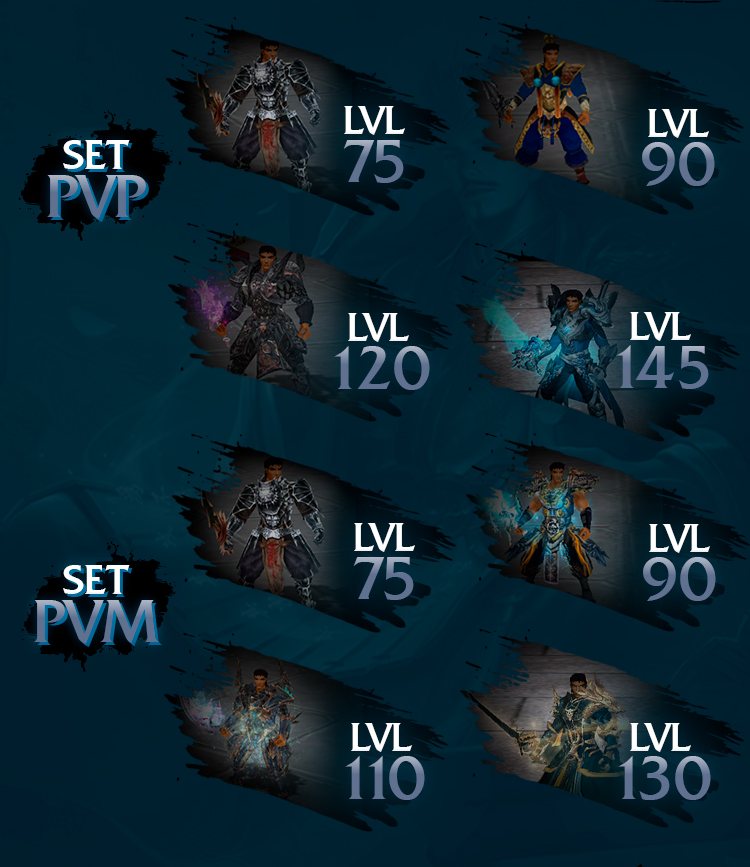
There is no single gear path: some sets are built for player versus player combat, others for monster hunting, with different bonuses.
You climb through the sets as you grow, up to level 165.
Elemental talismans
Six talismans — Fire, Ice, Earth, Darkness, Wind and Lightning — worn in the pendant slot. They are born from the Metin stones of the Elemental Land: one map split into six regions, one per element, where the stones respawn every 10 seconds and drop the +0 talisman of their region 3% of the time, along with fragments and gems.
Up to +100 (from level 40) every step adds 1 point of elemental power: fragment, gem and 6,500,000 yang, 75% success. From level 165 you go up to +150: power reaches 120 and you also gain Resistance to the element and Strong against bosses, up to +14.
Careful: if an upgrade fails, the talisman is lost. The Pelagia Chest, dropped by the boss Pelagia 70% of the time, always holds a random talisman; the Talisman Enchant rerolls its bonuses.

Stoles
Stoles are worked by Theowahdan, in the capitals and in the Arena of the Damned. Four grades: Simple (1%), Fine (5%), Noble (10%) and Tailored, which absorbs from 11% to 25%.
Combination: two stoles of the same grade go up to the next one — Simple→Fine 80% for 100,000 yang, Fine→Noble 70% for 200,000, Noble→Tailored 50% for 300,000 — and two Tailored stoles together add 1 to 5 points, up to 25%. If it fails you only lose the second stole.
Absorption: the stole permanently takes the bonuses of a weapon or armour (which is used up), plus that percentage of its attack or defence. It is done once per stole: choose the piece well.

Instanced dungeons
Every dungeon is an instance: a copy of the map only for you or your group. No queues, nobody stealing your boss. You enter by talking to the entrance NPC, alone or with your group depending on the dungeon, and if you fall out you can go back in.
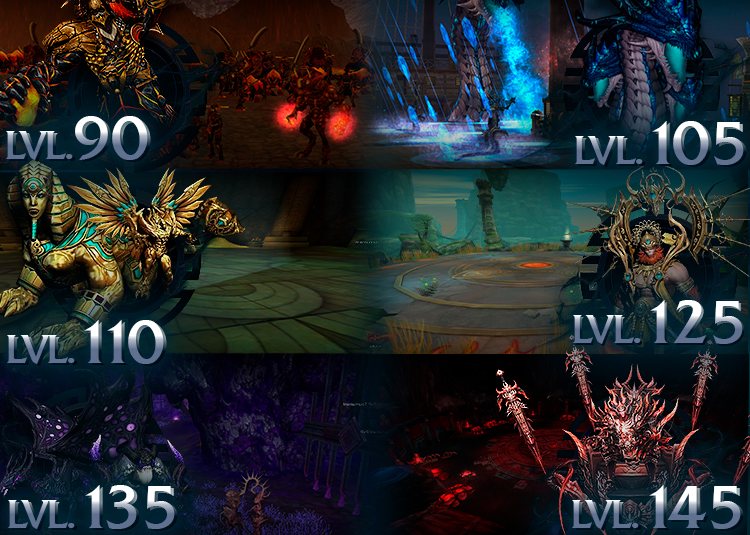
There are 14: Demon Tower (40), Baroness (70), Dragon's Lair (75), Catacombs (80), Flames and Snows (90), Shadow Zone (90), Ship Defence (105), Meley's Lair (110), Wukong (125), Demon Dungeon (140), Vikings (155), Pyramid (160) and Naga Temple (165).
No waiting between runs, except the Ship (10 minutes). The last ones are timed: 20 minutes for the Vikings, 25 for the Naga, 60 for the Pyramid. Keys are only needed for the Shadow Zone and the Pyramid.
PvP tournament
The tournament is fought in the Arena of the Damned, in four 36×36 m rings with a stand where the audience watches invisible and cannot be attacked. When the staff opens it, an announcement to the whole server gives tier and prize: talk to the Battle Administrator in the villages, choose Take me to the arena and then Sign up. It is free, only your level counts and you sign up once per tournament.
There are three tiers, played one after the other: 90-119, 120-154 and 155-165. When sign-ups close, a bracket shows the pairings: single elimination, every match best of 3 duels. After 10 seconds of preparation and the 3-2-1-GO, each duel lasts at most 5 minutes; when time runs out, the one with more HP in percentage wins.
In the rings skill buffs, buffers and mounts are not allowed, and whoever loses keeps their items and pays no death penalty. If your client closes you have 60 seconds to rejoin with the score intact; whoever does not show up loses the match. Before the final, the two semi-final losers play for third place.
At the end the podium is announced. The winner receives the tier's prize: the Stellar Chest in 90-119 (Ruby Gems and Ruby Fragments) and the Draconic Chest in 120-154 (draconic materials and Black Gold Bars); in 155-165 the prize is awarded by the staff. The Battle Administrator always shows the ranking of the last tournament.
In-game wiki
Press H (or the Wiki button on the taskbar): 14 categories and 60 entries inside the client. Levelling guides by range (1-90, 90-125, 125-140, 140-165), PvP sets and equipment, costumes, mounts and pets, chests, bosses, monsters, Metin stones, 10 systems and 10 dungeons.
Two searches, by item and by monster, with suggestions as you type: for an item you see which chests and monsters drop it and what you need to refine it, for a monster its 3D model and its drops. Every dungeon page has phases, difficulty, recommended bonuses and talisman, and boss drops.

Shop search
Open the Shop search from the expanded taskbar and look up any item by name or category — weapons, equipment, costumes, Dragon Alchemy, books, pets, mounts: you see who sells it, how many and at what price, across every open shop.
Filter by class, level, price range, refinement, sex and stole absorption. With More filters you search for a bonus with a minimum value, free sockets or a specific seller, and hide duplicates. Sort by price, level, name or quantity, up to 300 results per page.
Select one or more items and press Buy: you buy straight from the window. If someone else buys an item first, the list updates in real time.

Switchbot
Press F9, drop the item into one of the 5 slots and set up to 5 bonuses in two alternatives. Press Start: the Switchbot rerolls the item 10 times per second and stops on its own as soon as one of the two combinations comes out, with values equal or higher. A private message tells you it is done.
Each reroll uses 1 Enchant item from your bag (on talismans, the Talisman Enchant); when they run out, the slot stops and warns you. It keeps working with the window closed and when you change map. The Manual tab rerolls one step at a time and shows your last three results in green or red.

Vote4Buff
Click the VOTE icon at the bottom left: the window lists the 5 active toplists. Press Vote on a row, vote on the site and come back to the game: within 20 seconds the row lights up, without logging out.
Every vote is worth +5% EXP, +3% drop and 20 minutes of auto hunt for 24 hours, with a separate timer for each toplist. With all five you reach +25% EXP, +15% drop and 100 minutes of auto hunt, for every character on your account.

Skill colours
When an active skill reaches Perfect, its colour button appears in the Skills tab of the Character window. Each effect has 5 layers you can colour one by one, or all together with All colours.
Pick from the palette or type a code such as #FFFFFF, save up to 10 favourite colours and press Change colour. It is free, no item needed, and the buffs you cast on others keep your colour.

Battle Pass
Press F6. The season is the calendar month: you activate your pass with its ticket and every mission you complete gives points to climb the 20 levels of the reward track.
There are 17 missions — 300 monsters, 15 Metin stones, 20 bosses, 5 dungeons, 2 hours of play and more — that come back every 12 hours, every week or every month. Three passes: PRO, Premium Plus and Evolution. A higher pass includes the rewards and missions of the ones below, and if you activate mid-month you collect at once the rewards of the levels you already reached.
Claim all takes every reward you earned in one click; with a full inventory the reward waits for you. Battle Pass tickets are spent in the shop tab of the same window.

Graphics
From Esc → Game options → Graphics options you control everything: Off, Medium, Ultra and Epic presets (Off removes shadows for less powerful PCs), shadow quality and casting, reflections, sharpness, grass type (autumn and flowers too) and puddles.
For performance you choose how far shops are shown, the effects level, fog, trees, clouds and whether to show pets, mounts and NPC names. And the mood is yours: 12 skies (night included), weather from clear to storm and snow in the villages. Every option has a "?" button that explains what it changes.
Multifarm block
Two characters at a time can farm per connection and per PC, across all channels. From the third one the client opens and the character plays, gains experience and does missions, but gets no drops of items or yang and cannot mine.
An icon among your active effects tells you whether that character can farm; click it to choose which two, with 10 seconds between changes. The Multifarm Unlock, a rare drop in the Pyramid, raises the limit to 3 for a few days. That way whoever plays with two hands does not compete with whoever opens ten.
War of the Kingdoms
Every evening at 21:00, every day, Shinsoo, Chunjo and Jinno fight for one hour. The server warns 3 hours, 2 hours, 1 hour, 30, 15 and 5 minutes before, in game and on Discord. From level 90 you talk to Uriel in your village and step onto the field: lives are unlimited, whoever falls comes back to fight.
The battlefield changes every time, drawn at random between a fire front and a snow front. You enter with one character per person: anyone arriving with the same IP or the same PC as someone else is sent back to the village. No mounts. Every player of another kingdom you take down is worth 1 point, whatever their level; kills between characters of the same person do not count.
First phase: when two kingdoms reach 50 points, the third is eliminated and sent home. Final: points start again from zero and the first of the two to reach 50 wins; the losers go back to their village and the final boss, the Elite Nine Tails, appears on the field. If nobody gets there before the hour is up, the kingdom with the most points wins, and in the final a tie is broken by the first-phase points.
The war only counts if it is really fought: at least 2 different players in each of the three kingdoms and at least 5 kills between real players. Otherwise it is cancelled, with no winner. Announcements give the score of the three kingdoms every 10 minutes and every 5 points, warn at 5 minutes and at the last minute, and finally proclaim the winner.
The reward goes to the whole winning kingdom, until 21:00 the next evening: EXP +100%, drop +100%, yang +60% and double loot from Metin stones. On top of that its village becomes the server's capital for 24 hours. There are no personal prizes: you fight for your kingdom, and even those who were not there that evening get the bonus.
World Boss
The World Boss is launched by the staff. A 10-minute call is announced to the whole server: open the Teleport Ring, choose Events in progress → World Boss and, as soon as you enter the Arena of the Damned, you are signed up to your level tier automatically. One character per person: a second character with the same account, IP or PC is refused.
There are three tiers fighting at the same time, each with its own boss: 75-99 (60 million HP), 100-139 (300 million) and 140-165 (1.5 billion). A tier's boss only appears if at least 2 players sign up, and only that tier's players can hit it. For the whole event PvP is free in the arena, without losing items or alignment.
The boss stays for 20 minutes: a live damage ranking, refreshed every 2 seconds, shows the top 10 of your tier, your position and your damage. When it dies or flees, rewards go to the top 5 of every tier, plus a consolation prize for anyone who dealt at least 0.5% of its HP. One reward each, straight to your inventory or to the Shop Storage: the boss drops nothing on the ground.
In the 140-165 tier the winner takes a +0 Draconic weapon of their class, second place the Draconic armour, third the Draconic helmet or shield, fourth and fifth a Draconic jewel, all with Stardust and gold bars. In the other two tiers you win Stardust, bars, Enchant Alchemy, Enchant and Reinforce item, stones and scrolls.

Dungeon window (F5)
Press F5 (or the minimap button): the window lists the dungeons with minimum and maximum level, whether a group or a ticket is needed, and already selects the best one for your level. Each one shows its status: Ready, on cooldown with the time left, or You can rejoin within… after a disconnection (5 minutes).
The Teleport button takes you to the entrance for free; if you lack the ticket it warns you before you leave, and the Shop button opens the key vendor. Tick Notify me and when a cooldown ends you get the message "press F5 to enter".
The Ranking tab shows the 10 players who completed each dungeon the most times, with your own count below.

Periodic missions
The Missions window, from the expanded taskbar, gives you 4 daily, 3 weekly and 3 monthly missions, drawn for your character and matched to your level.
They are free and progress on their own while you play: monsters, Metin stones, bosses, dungeons, fishing, play time, alchemy refinements. Real examples: 400 monsters or 10 Metin stones a day, 7 dungeons a week, 20,000 monsters a month. Monsters, Metin stones and bosses count if they are no more than 15 levels below you.
They renew at midnight, on Monday at 00:00 and on the 1st of the month, and the window shows how long is left. When you complete one, a message appears in the chat.

In-game calendar
Press F8: the in-game calendar shows the events of Today, the Week and the Month, with time, duration, kingdom, channel, how to take part and what you win. Every event says whether it is LIVE, how long until it starts or whether it has ended.
Tick Remind me 5 minutes before and you get the big message in the middle of the screen and a private message, even with the calendar closed. With Show live events a movable box stays on screen with the current event or the one starting within 30 minutes.

Dragon Alchemy
From level 120 Alchemy opens (O key): six Dragon Stones — Diamond, Ruby, Jade, Sapphire, Garnet and Onyx — one per slot, in 2 decks you switch on with the Activate button. Each stone has 24 hours of use, which only run while the deck is active.
Each stone has a base bonus (Garnet, for example: +2,000 HP and lightning resistance) and up to 3 random extra bonuses: bosses, monsters, Metin stones, strong against the classes, critical, HP steal. Their strength depends on grade (Rough → Mythic), clarity (Matt → Excellent) and level (+0 → +6): a Mythic Excellent +6 is worth 150% of the base.
The Refine tab opens anywhere: combine 2 identical stones to raise grade or clarity, or a stone and a Dragon Bean for the level; Refine all prepares every ready pair. Dragon Hearts drop from bosses such as the Baroness and Beran-Setaou, and the Alchemist trades them for the Dragon Stone Shards of the Metin stones.

Equip Swap
Open Quick equip change from the inventory or the expanded taskbar: you have 10 sets to save, each with 19 slots across equipment, costumes and accessories (rings, belt, stole). Wear your PvM gear, press Save current equip and give it a name with Rename (up to 20 characters).
Then one click on Wear set swaps everything you have on with the set; a second click puts your previous gear back. It is all or nothing: if a single piece cannot be worn, the swap does not start, so you are never left half-dressed.
There are 7 seconds between two swaps, and you cannot swap in combat (an attack or skill in the last second and a half) or with a shop, storage or trade window open.

Bonus table
In the Character window click the arrow on the right edge: a panel docks next to it with 55 bonuses of your character and their current values, in 5 collapsible categories: PvM, PvP, Attack, Defence and Elemental.
Type in the search box ("boss", "critical"…) and you see the value at once, without adding up tooltips piece by piece. The second tab counts your kills: players of each kingdom, duels won and lost, monsters, bosses and Metin stones destroyed.

Chest preview
Hold Ctrl and right-click a chest in your inventory: you see everything it can contain, with icon, quantity and full tooltip, 40 items per page. For class chests you only see what can drop for you.
If you have a stack, choose how many to open with the slider and press Open: only the ones that fit in your inventory are opened, the rest stay. With Ctrl+Z+right-click you open the whole stack at once, up to 99,999.

Translated chat
Write in your language: whoever reads sees the message in theirs, marked [auto]. It works for local chat, shouts and private messages, in eight languages: Italian, English, German, Spanish, Portuguese, Romanian, Polish and Turkish.
Players with the same language as you get your text right away. If the translator does not answer, the original arrives: no message is lost. With the /translate command you switch it off and on.